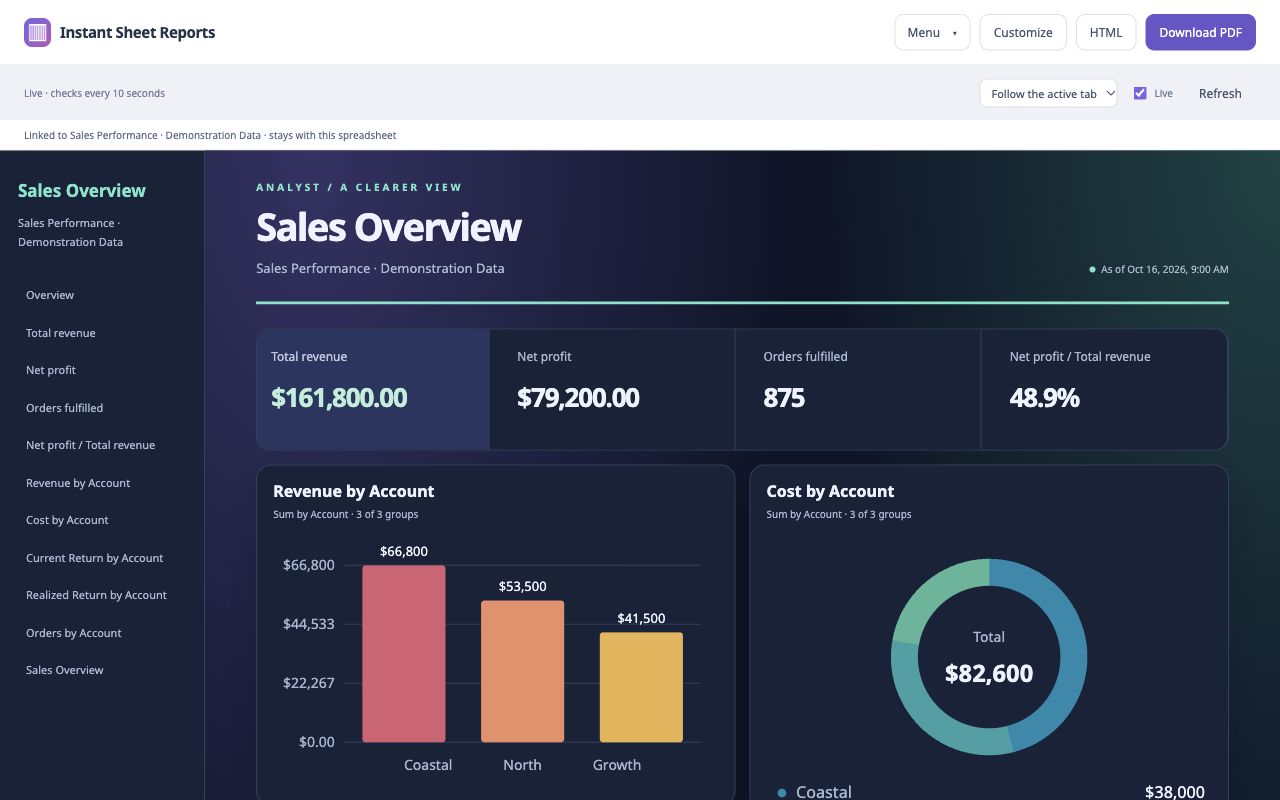
You already did the work of getting your data into a spreadsheet. Seeing what it means—and keeping your eyes on the right row—should be the easy part.
Our new Instant Sheet add-ons take care of two familiar frustrations: building a useful visual report from a sheet full of numbers, and reading across a large sheet without losing your place. Instant Sheet Reports gives your data a clear, shareable presentation. Instant Sheet Highlighter makes the source sheet much easier to scan.
Instant Sheet Reports: the easiest you'll ever use, the last you'll ever need
Instant Sheet Reports is the easiest data visualization tool you'll ever use—and the last you'll ever need. Open your Google Sheet, click the extension, and start with an automatic dashboard of charts, tables, and featured totals. You get something useful to work with right away.
The tool looks for headers, tables, formulas, and nearby labels to recognize your data and suggest ways to show it. A sales sheet can become a report with revenue totals and charts comparing accounts. A project tracker can become a clearer view of activity across teams. Review the suggested results, adjust what matters, and move on with your day.
There are no AI prompts to write, model responses to wait for, or per-report AI processing fees. The visualization engine uses rules to analyze the workbook. If automatic recognition misses a total or a section, add a widget from a cell reference or build a chart from the ranges you choose.
A quick start, with room to make it yours
Click a chart, total, or table to open its editor. Change titles and colors, choose the fields to compare, adjust sorting and filters, or show only the columns your audience needs. Five layouts and twelve chart styles give you plenty of ways to tell the story in your data, from a compact working dashboard to a polished executive overview.
When the report is ready, download a PDF or standalone HTML file. Customize the header and footer, add a Prepared by name, and include linked navigation so readers can find the section they need. You can also keep a live dashboard connected to its original Google Sheet while you work; downloaded reports capture a snapshot.
Your presentation choices stay with the report. Renaming a chart or filtering a report table leaves the source workbook intact. You can even open a downloaded Excel workbook locally when you need a report from a file rather than a live sheet.
Instant Sheet Highlighter: a necessity for large sheets
If you regularly work in large data sheets, Instant Sheet Highlighter is a necessity. It makes scanning large spreadsheets much easier by giving your eyes a clear path across the selected row, down the selected column, or both.
Think about checking a name against a value fifteen columns away. Or comparing a long list of entries beneath the same heading. A small selection box is easy to lose in a dense grid. With Instant Sheet Highlighter, select a cell and a gentle tint follows your place as you move with the mouse or keyboard, scroll, and work around frozen panes.
Turn row and column highlighting on independently, then choose the color and strength that feel comfortable. Use a row highlight for wide records, a column highlight for vertical scanning, or both when you want a clear crossing point.
Your view stays yours
The highlight is a private, temporary overlay. It leaves cell values, formatting, and undo history alone, and collaborators do not see it. The highlighter reads the position of your selection, not the contents of your cells.
Two everyday tools. Simple pricing.
Instant Sheet Reports is being prepared for Safari on Mac, Chrome, and the native Google Sheets add-on marketplace. Instant Sheet Highlighter is being prepared for Safari on Mac and Chrome. Both offer a 14-day free trial, followed by a one-time permanent license: $4.99 for Reports or $0.99 for Highlighter. Each marketplace has its own license. These are US base prices; applicable tax and local App Store pricing may vary. There is no subscription or automatic charge.
Store releases are pending approval. Visit the Instant Sheet Reports page and Instant Sheet Highlighter page for current availability and download links as they become available. Our setup and support guide covers getting started, live updates, and report recognition.